Posts

Showing posts from June, 2014

Problems on Moving Data

Problems Write programs that will accomplish the desired tasks listed below, using as few lines of code as possible. Use only opcodes that have been covered up to this chapter. Comment on each line of code. 1. Place the number 3Bh in internal RAM locations 30h to 32h. 2. Copy the data at internal RAM location Flh to R0 and R3. 3. Set the SP at the byte address just above the last working register address. 4. Exchange the contents of the SP and the PSW. 5. Copy the byte at internal RAM address 27h to external RAM address 27h. 6. Set Timer 1 to A23Dh. 7. Copy the contents of DPTR to registers R0 (DPL) and R1 (DPH). 8. Copy the data in external RAM location 0123h to TL0 and the data in external RAM location 0234h to TH0. 9. Copy the data in internal RAM locations 12h to 15h to internal RAM locations 20h to 23h: Copy 12h to 20h. 13h to 21h, etc. 10. Set the SP register to 07h and PUSH the SP register on the stack; predict what number is PUSHed to address 08h. 11. Ex...
Summary of Moving Data

Summary The opcodes that move data between locations within the 8051 and between the 8051 and external memory have been discussed. The general form and results of these instructions are as follows. Instruction Type Result MOV destination, source Copy data from the internal RAM source address to the internal RAM destination address MOVC A, source Copy internal or external program memory byte from the source to register A MOVX destination, source Copy byte to or from external RAM to register A PUSH source Copy byte to internal RAM stack from internal RAM source pop destination ...

Example Programs

Example Programs Programming is at once a skill and an art. Just as anyone may learn to play a musical instrument after sufficient instruction and practice. so may anyone learn to program a computer. Some individuals. however. have a gift for programming that sets them apart from their peers with the same level of experience. just as some musicians are more tal­ented than their contemporaries. Gifted or not. you will not become adept at programming until you have written and rewritten many programs. The emphasis here is on practice; you can read many books on how to ride a bicycle, but you do not know how to ride until you do it. If some of the examples and problems seem trivial or without any "real-world" appli­cation. remember the playing of scales on a piano by a budding musician. Each example will be done using several methods; the best method depends upon what resource is in short supply. If programming time is valuable. then the best program is the one that uses t...

Data Exchanges

Data Exchanges MOV, PUSH, and POP opcodes all involve copying the data found in the source address to the destination address; the original data in the source is not changed. Exchange instruc­tions actually move data in two directions: from source to destination and from destination to source. All addressing modes except immediate may be used in the XCH (exchange) opcodes: Mnemonic Operation XCH A,Rr Exchange data bytes between register Rr and A XCH A,add Exchange data bytes between add and A XCH A,@Rp Exchange data bytes between A and address in Rp XCHD A,@Rp Exchange lower nibble between A and address in Rp ...

PUSH and POP Opcodes

Image
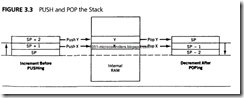
PUSH and POP Opcodes The PUSH and POP opcodes specify the direct address of the data. The data moves between an area of internal RAM, known as the stack, and the specified direct address. The stack pointer special-function register (SP) contains the address in RAM where data from the source address will be PUSHed, or where data to be POPed to the destination address is found. The SP register actually is used in the indirect addressing mode but is not named in the mnemonic. It is implied that the SP holds the indirect address when­ever PUSHing or POPing. Figure 3.3 shows the operation of the stack pointer as data is PUSHed or POPed to the stack area in internal RAM. A PUSH opcode copies data from the source address to the stack. SP is incremented by one before the data is copied to the internal RAM location contained in SP so that the data is stored from low addresses to high addresses in the internal RAM. The stack grows up in memory as it is PUSHed. Excessive PUSHing can make the ...

Code Memory Read-Only Data Moves

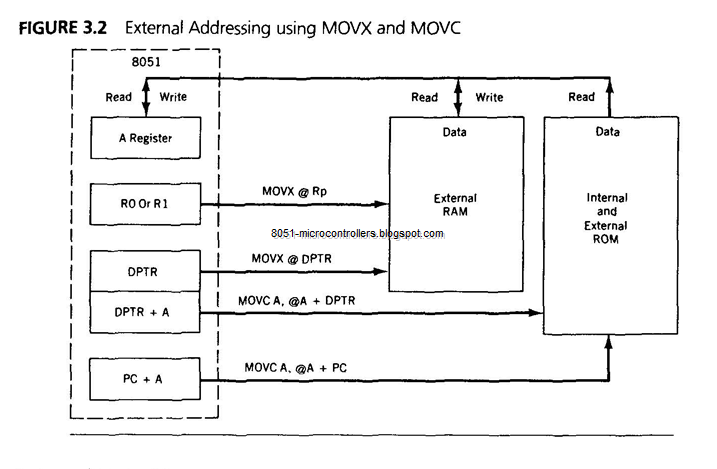
Code Memory Read-Only Data Moves Data moves between RAM locations and 8051 registers are made by using MOV and MOVX opcodes. The data is usually of a temporary or "scratch pad" nature and disap­pears when the system is powered down. There are times when access to a preprogrammed mass of data is needed, such as when using tables of predefined bytes. This data must be permanent to be of repeated use and is stored in the program ROM using assembler directives that store programmed data anywhere in ROM that the programmer wishes. Access to this data is made possible by using indirect addressing and the A register in conjunction with either the PC or the DPTR, as shown in Figure 3.2. In both cases, the number in register A is added to the pointing register to form the address in ROM where the desired data is to be found. The data is then fetched from the ROM address so formed and placed in the A register. The original data in A is lost, and the addressed data takes its place...

Indirect Addressing Mode

Image
Indirect Addressing Mode For all the addressing modes covered to this point, the source or destination of the data is an absolute number or a name. Inspection of the opcode reveals exactly what are the addresses of the destination and source. For example, the opcode MOV A,R7 says that the A regis­ter will get a copy of whatever data is in register R7; MOV 33h,#32h moves the hex number 32 to hex RAM address 33. The indirect addressing mode uses a register to hold the actual address that will finally be used in the data move; the register itself is not the address, but rather the number in the register. Indirect addressing for MOV opcodes uses register R0 or R1, often called "data pointers," to hold the address of one of the data locations, which could be a RAM or an SFR address. The number that is in the pointing register (Rp) cannot be known un­less the history of the register is known. The mnemonic symbol used for indirect address­ing is the "at" sign, which ...

Direct Addressing Mode

Direct Addressing Mode All 128 bytes of internal RAM and the SFRs may be addressed directly using the single ­byte address assigned to each RAM location and each special-function register. Internal RAM uses addresses from 00 to 7Fh to address each byte. The SFR addresses exist from 80h to FFh at the following locations: SFR ADDRESS (HEX) OED A 0E0 B 0F0 DPL 82 DPH 83 IE 0A8 IP 0B8 PO 80 ...

Moving Data

Image
Moving Data Outline: o Introduction o Addressing Modes o External Data Moves o PUSH and POP Opcodes o Data Exchanges o Example Programs o Summary Introduction A computer typically spends more time moving data from one location to another than it spends on any other operation. It is not surprising, therefore, to find that more instructions are provided for moving data than for any other type of operation. Data is stored at a source address and moved (actually, the data is copied) to a desti­nation address. The ways by which these addresses are specified are called the addressing modes. The 8051 mnemonics are written with the destination address named first. fol­lowed by the source address. A detailed study of the operational codes (opcodes) of the 8051 begins in this chapter. Although there are 28 distinct mnemonics that copy data from a source to a destination, they may be divided into the following three main types: 1. MOV destination. source 2. PUSH sour...

ASSIGNMENTS on Software Development Systems and Assemblers

Image
ASSIGNMENTS Check the appropriate answer in 1-10. 1. The process of accessing information on a floppy disk is a. random. b. serial. c. semirandom. 2. The operating system of a computer is defined as hardware that operates the floppy disk. a program that manages files on the disk. a group of programs that manages and directs hardware and software in the system. 3. The Editor is an assembly language program that reads and writes information on the disk. a high-level language program that allows the user to edit programs. a program that allows the user to write, modify, and store text in the computer system. 4. The Assembler is a compiler that translates statements from high-level language into assembly language. a program that translates mnemonics into binary code. an operating system that manages all the programs in the system. 5. A ...

SUMMARY of Software Development Systems and Assemblers

SUMMARY A software development system and an assembler are essential tools for writing, assembling, testing, and debugging large assembly language programs. A disk-based microcomputer, its operating system, and assembler pro­grams can serve as a development system. All the operations of the computer are managed and directed by the operating system of the computer. The Assem­bler and other utility programs assist the user in developing software. The Edi­tor allows the user to enter text, and the Assembler translates mnemonics into machine code and provides error messages. The Debugger assists in debugging the program. The cross-assembler is an assembler program that operates under one type of MPU and can translate mnemonics of another MPU. The program thus assembled is in many ways similar to that of the hand assembly program except that the program written for the assembler includes assembler directives, which are instructions concerning how to assemble the program. The assembler...

WRITING PROGRAMS USING A CROSS-ASSEMBLER

Image
7.4 WRITING PROGRAMS USING A CROSS-ASSEMBLER This section describes a commercially available Z80 cross-assembler and the pro­cess of assembling a program. The description in the following sections is equally applicable to both assemblers and cross-assemblers; therefore, the term assem­bler should be interpreted as the representation of both. The assembly process is illustrated with a simple example from the last chapter. 7.4.1 Z80Cross-Assembler The Z80 cross-assembler from 2500AD Software, Inc. * is one among several of such commercially available products. It includes two programs: X80 and LINK. In this assembler, translating mnemonics into binary code is a two-step process. The X80 translates the source file into modules of the Z80 code and generates two files: one is called the list (LST) file, and the other is called the object (OBJ) file. (This assembly process and the file names may vary slightly from assembler to assembler.) In addition to translating mnemonics, the assem...

ASSEMBLERS

Image
7.3 ASSEMBLERS The assembler (or the cross-assembler), as defined before, is a program that trans­lates assembly language mnemonics or source code into binary executable code. Here, we are using the term assembler to include all the utility programs (such as Assembler and Linker) necessary for the assembly process. This translation pro­cess requires that the source program be written strictly according to the specified syntax of the assembler. The assembly language source program includes three types of statements: 1. The program statements in Z80 mnemonics, which are to be translated into binary code. 2. Comments, which are reproduced as a part of the program documentation. 3. Directives to the assembler that specify such items as starting memory loca­tions, label definitions, and required memory spaces for data. The first two types of statements have been used in the program of adding two Hex numbers in the last chapter. The format of these statements as they appear in an a...